Pages

Showing posts with label Photo Software. Show all posts

Friday, September 23, 2011

FotoSketcher


FotoSketcher converts your digital images into pencil sketches, pen and ink drawings or various painting styles (watercolor, oil painting etc.). Just load the photo, select the desired sketch style and the program will instantly apply the effect. You can tweak various drawing parameters to simulate different drawing styles, add a photo frame or text, and save the digital sketch as new image without changing your original photo.In addition to sketch and paint conversions, Fotosketcher can also apply vintage photo and sepia effects.

Installs the ASK browser toolbar unless you opt-out during setup.

License Freeware (Ad-supported) Home page
Windows 32/64-bit XP/Vista/7 http://www.fotosketcher.com/

v.2.20
DOWNLOAD

http://www.mediafire.com/file/t2tkcccmppk9bw7/FotoSketcher2.20.exe


portable version (standalone exe file, for use on USB flash drives

http://www.filesonic.com/file/1963268934/PortableFotoSketcher.exe

Saturday, October 2, 2010

Pictomio- photo organizer


Pictomio is freeware and raises the bar when it comes to displaying your 3D-accelerated photo and video collections and comes with great geo tagging features.
Pictomio is a software application intended for managing, categorizing, searching, and archiving photos as well as geotagging photos and videos that also allows you to generate animated 2D and 3D slideshows.

Minimum requirements
Intel or AMD x86 CPU with >1 GHz
1GB RAM
Shader Model 2.0 graphics card with 128 MB of Video RAM
500 MB of available hard drive space (depending on number of managed photos)
Operating system Windows XP,Vista or 7


1.2 incl. pictoGEO
Add-On for Windows XP / Vista / 7

Download

http://www.mediafire.com/file/9x9pehdexcu3u38/pictomio.exe

Wednesday, September 9, 2009

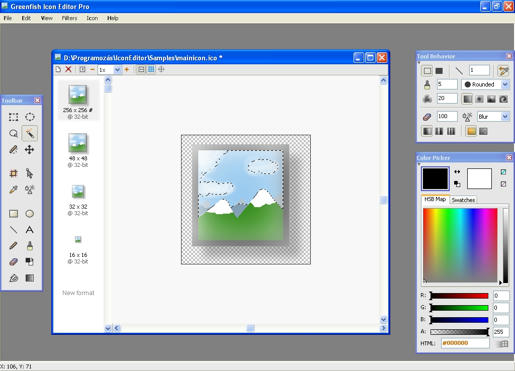
Greenfish Icon Editor Pro 2.0


This program is a professional, yet easy to use tool for creating icons, cursors, and other small pixelgraphic images.
Why is it recommended for everyone?
* Easy to use, lightweight, requires no installation (portable)

* Supports file drag and drop

* Has multilanguage support (included: English, Chinese, French, German, Hungarian, Italian, Japanese)

* Help also available in French, separate download

* Click here to help us by translating the program

* Sample icons are included
* Uses dynamic color depth: you do not have to specify it explicitly, Greenfish Icon Editor will determine it for you.


Why is it useful and 'pro' as an icon editing tool?

* Opens and saves in ICO, CUR, PNG, XPM, BMP and JPEG formats

* Can create icons and cursors up to 256x256 @ 32-bit, which can also be PNG-compressed for use in Windows Vista(tm)

* Can extract icons and cursors from executable files and icon libraries
* Can batch convert image files to icons, or to another image format

* Has advanced selection handling (marquee, lasso and wand tools, saving/loading selections from files)
* Offers various gradient styles for filling shapes
* Lots of filters including Remove matte, Drop shadow, Inner/Outer glow and Bevel .

Platform: Windows 95/98/NT/2000/XP/Vista/7
Size: 0.9 Mb

download

http://www.mediafire.com/file/1wmzyznm0wd/Greenfish Icon Editor Pro 2.0.exe


Site:
http://greenfish.extra.hu/


Version history (What's new?)

* 2.0

o Added feature: Layer support with lots of blend modes
o Added feature: native GFIE file format
o Added feature: when resizing a page, user can choose between cropping and stretching
o Added feature: cell grid (for editing toolbars)
o Fixed bug: an error occurred when trying to modify file associations without running GFIE as administrator
o Improved: painting with a transparent color now erases


Monday, September 8, 2008

PIXresizer

PIXresizer is a photo resizing program to easily create web and e-mail friendly versions of your images with reduced file sizes.

The reduced files are saved in a different folder, so your original images are not altered at all. PIXresizer offers several different resizing methods to choose from and can automatically recognize image sizes to calculate the best fit. In addition, it can convert between image formats (JPEG, GIF, BMP, PNG and TIFF), rotate images, convert to grayscale and resize multiple images in batch mode. A great companion for webmasters and digital photographers.

Windows9*/ME/NT/2*/XP/Vista

website:

http://bluefive.pair.com/pixresizer.htm

Download

older version compatible with Windows 95

Download


Share This