Pages

Showing posts with label Security Software. Show all posts

Friday, September 23, 2011

BufferZone Pro


BufferZone Pro is a unique system security suite that uses virtualization technology to protect your computer from any type of external threat by isolating new files and programs from the rest of your operating system. The program creates an isolated environment called the "Virtual Zone" in which all new applications and files are run until you decide that they are safe to be moved into your "real" computer environment.
The entire process is seamless and fully automated. You will see a thin red border around any window that is currently run from the Virtual Zone, indicating that the program cannot make any modifications to your hard drive and registry.

BufferZone is ready to use immediately and automatically protects popular browsers, instant messengers and download clients. If your favorite programs are not protected by default, you can easily add them to the list. You can also run any previously downloaded file or program inside the Virtual Zone by choosing the option from the Explorer right-click menu. Other features includes advanced application rules, and integrated firewall (for apps inside the buffer zone), external drive virtualization, personal file protection and more.

(Not compatible with 64-bit)


Windows XP/Vista/7

Home page http://www.trustware.com/

Saturday, October 2, 2010

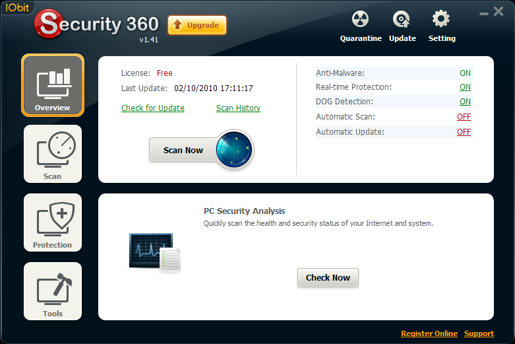
Iobit security360 Portable


IOBit Security 360 is an advanced freeware antivirus / anti-malware utility that detects, removes deep infections, and helps to protect your PC from various spyware, adware, trojans, keyloggers, bots, worms, and hijackers."

Home:
http://www.iobit.com/security360.html

Download
http://www.mediafire.com/file/71karmbaeqq37mc/IS360%20Portable.zip

Friday, September 17, 2010

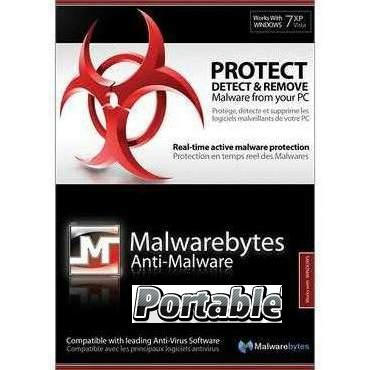
Malwarebytes' Anti-Malware Portable


Malwarebytes' Anti-Malware 1.46

Support for Windows 2000, XP, Vista, and 7 (32-bit only)
on windows vista / 7 run as Administrator
Made with : JauntePE (a.k.a.JPE) in short is, a freeware application virtualization suite
Download #1
http://www.mediafire.com/file/nefr1epednmfb3g/Malwarebytes%27%20Anti-Malware%20v1.46%20Portable.zip

Download #2
http://www.mediafire.com/file/rn9sl7mpptg68wr/Malwarebytes.Anti-Malware.1.46_Portable.rar
made with :PortableApps.com
Support is not known

Tuesday, May 5, 2009

Panda-cloud anti-virus

Web Site: http://www.cloudantivirus.com/

What's Different

Traditional antivirus products for PCs rely on multiple, locally installed technologies to intercept each file at different layers. The scanning is enabled for entry vector, file system and execution processes.

Traditional antivirus products scan these layers using antivirus, heuristics, intrusion prevention and behavioral analysis modules. This approach process results in heavy usage of local PC memory and CPU resources, thus impacting the computer's performance.

Panda's new approach uses the thin-client agent for on-access, asynchronous cloud scanning. This strategy combines local detection technologies with real-time cloud scanning to maximize protection while minimizing resource consumption. The model blocks malicious programs as they attempt to execute, while managing less dangerous operations via nonintrusive background scans.

"Protection from the clouds is much better. Performance on the computer is not impacted," Santana said.

Collective Intelligence

The company is counting on the free download of Panda Cloud Antivirus even after the beta phase to build a database of malware activity. Panda's proprietary cloud computing technology, called "Collective Intelligence," aims to harness the knowledge of Panda's global community of millions of users to automatically identify and classify new malware strains.

It takes the technology less than six minutes to scan each new file automatically received into the collective from users' computers, according to Panda. Collective Intelligence servers automatically receive and classify over 50,000 new samples every day.

Panda's Collective Intelligence system also correlates malware information data collected from each PC to continually improve protection for the community of users.

Dual Methods

Panda's technology blocks malware at the execution stage. That accounts for the economy of performance, Santana explained.

When users are not connected to the Internet, a local cache continues to provide protection to the computer. Since 95 percent of all computers are infected only while connected to the Internet, there is no inherent risk when the cloud application is not available, according to Santana.

Panda Cloud Antivirus includes local and remote antivirus, antispyware, antirootkit, heuristics and goodware cache.

Offline Functionality

Not having full antimalware functionality when not on the Internet should not be a concern, according to Dana Gardner, principal analyst at Interarbor Solutions.

"The offline cache does quite a bit of checking," Gardner told TechNewsWorld. "Something new can only cause an infection when the computer is connected to the Internet. So that doesn't concern me."

The amount of added protection available while offline could be a distinguishing factor between the free version and the professional-strength paid version, he noted.

"It's an innovative product. I'm intrigued by the use of the user network to build the signature base," he said.

Money Stream

Offering the free version is clearly a twofold strategy, according to Santana. One reason for doing it is to advance the name brand in the U.S.; the second is to ensure a maximum pool of users connected to the Collective Intelligence database in the cloud.

"I haven't convinced my board that Panda is a nonprofit organization yet," Santana quipped. "We aren't as well known by less-savvy consumers in the U.S. Offering the free version will help improve that."

Sunday, April 12, 2009

KeePass Password Safe

Technorati Tags:

What is KeePass?
Today you need to remember many passwords. You need a password for the Windows network logon, your e-mail account, your homepage's FTP password, online passwords (like website member account), etc. etc. etc. The list is endless. Also, you should use different passwords for each account. Because if you use only one password everywhere and someone gets this password you have a problem... A serious problem. The thief would have access to your e-mail account, homepage, etc. Unimaginable.
KeePass is a free open source password manager, which helps you to manage your passwords in a secure way. You can put all your passwords in one database, which is locked with one master key or a key file. So you only have to remember one single master password or select the key file to unlock the whole database. The databases are encrypted using the best and most secure encryption algorithms currently known (AES and Twofish). For more information, see the features page.

it is open source (OSI certified)

Website

http://keepass.info/

I’m using it and love it !

Monday, January 26, 2009

Unlocker

    It has many other flavors:

    Cannot delete file: Access is denied
    There has been a sharing violation.
    The source or destination file may be in use.
    The file is in use by another program or user.
    Make sure the disk is not full or write-protected and that the file is not currently in use.


  • Unlocker is the solution!
    • 1. Simply right click the folder or file and select Unlocker


      If the folder or file is locked, a window listing of lockers will appear


  • Similar programs and why Unlocker is better
    • Of course I only compare here the unlocking features. Process Explorer and Take Control are very good programs featuring much more things than just unlocking folders. The goal of this list is not really to pretend Unlocker is better but instead to provide a list of all other alternative programs in case you have some difficulties with Unlocker.


    Application Close
    handle
    Kill
    process
    Unload
    DLL
    Delete
    index.dat
    Delete
    Rename
    Move
    Invalid
    Names
    Without
    reboot
    With
    reboot
    Context
    Menu
    Command
    Line / GUI
    Free
    Unlocker 1.8.7
    by Cedrick Collomb
    okokokokokokokokokokokok
    Process Explorer
    by Sysinternals
    okoknonononooknononookok
    ForceDel
    by Zoltan Csizmadia
    oknononononooknonooknook
    WhoLockMe
    by Dr-Hoiby
    nooknonononooknooknookok
    FreeFile
    by Skrubbeltrang
    nooknonononooknononookok
    Take Control
    by Computers In Motion
    nooknonononooknononookno
    UnLock IT
    by EMCO
    nooknonooknooknooknookok
    Advanced Process Manipulation
    by DiamondCS
    okokoknononooknononookok
    DLL Master
    by Tony Shaftel
    nonooknononooknononookno
    12Ghosts Wash
    by 12ghosts
    nononooknonooknononookno
    czSweep Cookie Boss 1.31
    by Frank Kotasek
    nononooknonooknononookno
    DelinvFile
    by James A. Lawler
    nonononookokoknononookok
    Del FXP files
    by JRT Wine Software
    nonononookokoknononookno
    Pocket KillBox
    by Option^Explicit
    nononookoknonooknonookok
    Locked Files Wizard / Copylock
    by Noel Danjou
    nononookoknonooknonookok
    GiPo@MoveOnBoot
    by Gibin Software House
    nononookoknonookoknookok
    DelLater
    by DiamondCS
    nononookoknonooknonookok
    Delete Doctor
    by Kevin Solway
    nononookoknonooknonookok
    BusyDelete
    by Freezerware
    nononookoknonooknooknook
    Boot Deleter
    by TNT-BootBlock
    nononookoknonookoknonook

    Windows 2000 / XP / 2003 / Vista

    Download

    http://ccollomb.free.fr/unlocker/


    Share This