
Eliminate Firefox memory leaks
Firemin is a small app that eliminates all memory leaks
in Firefox and keeps memory consumption at bay. The program runs in the
system tray and constantly optimizes Firefox's memory by forcing it to
release some of the memory it so greedily hangs on to. During our
review, we ran Firefox with 8 opened tabs and just let it sit there for
30 minutes. During that time, memory consumption steadily increased to
nearly 100 mb. We then activated Firemin and memory consumption
decreased to 1-5 mb and remained within that range for the duration of
the test.
Firemin uses a save Microsoft API (EmptyWorkingSet) to force Firefox to
release some of the reserved memory without causing stability problems.
Runs in the system tray and does not require installation.
Screenshots
http://www.snapfiles.com/php/sfdwnld.php?id=113127&a=7149966&loc=2
The Good:
This really works well , and dose what it says
The Bad:
the Launch FireFox when Firemin starts did not work for me using Version
0.3.6.369
, but is no big deal I recommend this totally if your a FireFox user.
About Me
Showing posts with label Portable Apps. Show all posts
Showing posts with label Portable Apps. Show all posts
Saturday, November 3, 2012
Tuesday, October 25, 2011
XP Hyper Terminal
Original XP HyperTerminal
If you just can’t live without the original HyperTerminal in Windows XP, you can actually extract two files from your XP installation and copy them over to Windows 7 or Vista.
The two files you will need are hypertrm.dll and hypertrm.exe. Simply copy those files into any directory on your machine and it will work. You should be able to find hypertrm.exe in C:\Program Files\Windows NT and hypertrm.dll in C:\Windows\System32.
If you have the Windows XP CD, you should be able to find both of these files in the i386 directory on the CD.
Download
http://www.mediafire.com/file/191iitr21otxjl5/XP%20Hyper%20Terminal%205.1.2600.zip
OS : Windows xp, vista, 7
Saturday, October 2, 2010
Iobit security360 Portable
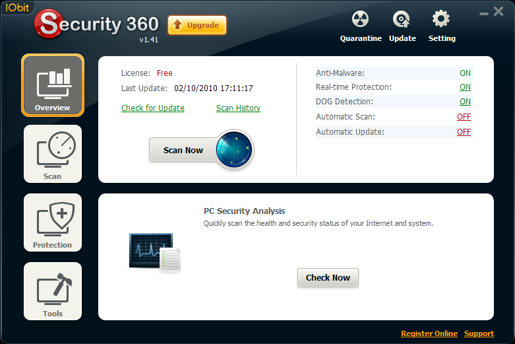
IOBit Security 360 is an advanced freeware antivirus / anti-malware utility that detects, removes deep infections, and helps to protect your PC from various spyware, adware, trojans, keyloggers, bots, worms, and hijackers."
Home:
http://www.iobit.com/security360.html
Download
http://www.mediafire.com/file/71karmbaeqq37mc/IS360%20Portable.zip
Free PDF to Word Doc Converter Portable
- Convert PDF to Word and preserve the original layout of your PDF in an editable Word Document.
- Extract text labels, graphics, shapes from PDF file into Word Doc file.
- Convert all the pages, or partial pages of PDF file to Word file.
- Support Adobe PDF 1.0 - 1.6 formats.
- Can automatically open the output Doc file when the conversion is done.
- Several PDF to Word conversion options are available for a better result.
- Convert in a high speed.
- Easy to use software.
- Totally for Free!
Note: Free PDF to Word Doc Converter cannot convert PDF file with password protection. You may need our PDF Password Recovery software to remove the password of PDF file before converting it to Word file.
for Windows xp,vista , 7
Download
http://www.mediafire.com/file/v6vx2uzvx5i2idi/pdf2wordsetup.zipFriday, September 17, 2010
Malwarebytes' Anti-Malware Portable
Malwarebytes' Anti-Malware 1.46
Support for Windows 2000, XP, Vista, and 7 (32-bit only)on windows vista / 7 run as Administrator
Made with : JauntePE (a.k.a.JPE) in short is, a freeware application virtualization suite
Download #1
http://www.mediafire.com/file/nefr1epednmfb3g/Malwarebytes%27%20Anti-Malware%20v1.46%20Portable.zip
Download #2
http://www.mediafire.com/file/rn9sl7mpptg68wr/Malwarebytes.Anti-Malware.1.46_Portable.rar
made with :PortableApps.com
Support is not known
Sunday, February 14, 2010
Close All Windows
This tool helps you to close all running applications with one click. It does not use system resources because it only flashes a “close” signal to all open windows on the desktop and then ceases. Just place a shortcut to the tool in the Start Menu, Quick Launch or elsewhere.

You can always add a hotkey to this shortcut. It is really very handy if you are running ~20 applications and want them all to quit instantly. It works just as if you were pressing the close button for each application.
Download - CloseAll.zip (18 KB)
Version History
- January 9, 2006 - Initial release
- From: http://www.ntwind.com/
- For All Windows
Wednesday, September 9, 2009
Greenfish Icon Editor Pro 2.0
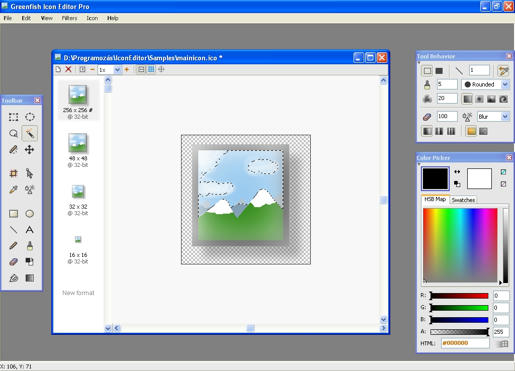
This program is a professional, yet easy to use tool for creating icons, cursors, and other small pixelgraphic images.
Why is it recommended for everyone? * Easy to use, lightweight, requires no installation (portable)
* Supports file drag and drop
* Has multilanguage support (included: English, Chinese, French, German, Hungarian, Italian, Japanese)
* Help also available in French, separate download
* Click here to help us by translating the program
* Sample icons are included
* Uses dynamic color depth: you do not have to specify it explicitly, Greenfish Icon Editor will determine it for you.
Why is it useful and 'pro' as an icon editing tool?
* Opens and saves in ICO, CUR, PNG, XPM, BMP and JPEG formats
* Can create icons and cursors up to 256x256 @ 32-bit, which can also be PNG-compressed for use in Windows Vista(tm)
* Can extract icons and cursors from executable files and icon libraries
* Can batch convert image files to icons, or to another image format
* Has advanced selection handling (marquee, lasso and wand tools, saving/loading selections from files)
* Offers various gradient styles for filling shapes
* Lots of filters including Remove matte, Drop shadow, Inner/Outer glow and Bevel .
Platform: Windows 95/98/NT/2000/XP/Vista/7 Size: 0.9 Mb
download
http://www.mediafire.com/file/1wmzyznm0wd/Greenfish Icon Editor Pro 2.0.exe
Site:
http://greenfish.extra.hu/
Version history (What's new?)
* 2.0
o Added feature: Layer support with lots of blend modes
o Added feature: native GFIE file format
o Added feature: when resizing a page, user can choose between cropping and stretching
o Added feature: cell grid (for editing toolbars)
o Fixed bug: an error occurred when trying to modify file associations without running GFIE as administrator
o Improved: painting with a transparent color now erases
Saturday, August 1, 2009
portable apps
Now you can carry your favorite computer programs along with all of your bookmarks, settings, email and more with you. Use them on any Windows computer. All without leaving any personal data behind.
Open
PortableApps.com provides a truly open platform that works with any hardware you like (USB flash drive, iPod, portable hard drive, etc). The entire platform is open source built around an open format that any hardware or software provider can use.
Website:
http://portableapps.com/
Open
PortableApps.com provides a truly open platform that works with any hardware you like (USB flash drive, iPod, portable hard drive, etc). The entire platform is open source built around an open format that any hardware or software provider can use.
Website:
http://portableapps.com/
Subscribe to:
Posts (Atom)

 Posts
Posts

