Pages

Friday, September 17, 2010

Malwarebytes' Anti-Malware Portable


Malwarebytes' Anti-Malware 1.46

Support for Windows 2000, XP, Vista, and 7 (32-bit only)
on windows vista / 7 run as Administrator
Made with : JauntePE (a.k.a.JPE) in short is, a freeware application virtualization suite
Download #1
http://www.mediafire.com/file/nefr1epednmfb3g/Malwarebytes%27%20Anti-Malware%20v1.46%20Portable.zip

Download #2
http://www.mediafire.com/file/rn9sl7mpptg68wr/Malwarebytes.Anti-Malware.1.46_Portable.rar
made with :PortableApps.com
Support is not known

Friday, September 10, 2010

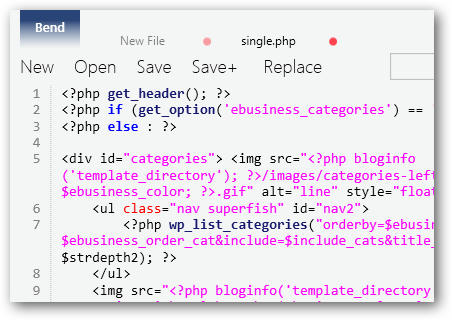
Microsoft Bend Text Editor

Bend is designed for Windows 7, but it will run on Windows Vista and XP if you have .NET 4.0 installed.
Bend is a beautiful new text editor that incorporates this new style great with the latest WPF technologies. It’s a nice replacement for Notepad, and a great programming and writing tool as well.
Download
http://www.mediafire.com/file/2l8ozqbu44qt9j1/Microsoft%20Bend.exe

Thursday, August 26, 2010

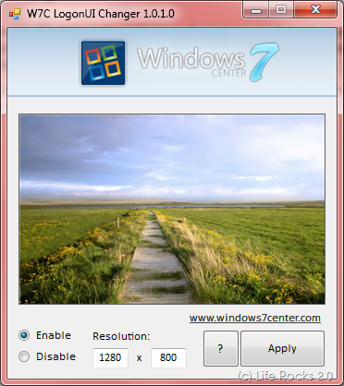
Windows Logon Changers


1.) created by Windows7center and allows you to select any image or wallpaper as your logon.

make sure to right click run as Administrator.
Download

http://www.mediafire.com/file/gt71rt251oct78y/W7C%20LogonUI%20Changer.exe

for: windows 7

Other changers
2.) Stardock LogonStudio allows Windows 7, Vista and XP users to apply and package new logon screens

3.)Tweaks.com Logon Changer for Windows 7

4.) Vista Visual Master Windows Vista 32-bit and 64-bit supported


5.) Logon Controller
Change Logon Background of Windows Vista or Windows 7 with Logon Controller.

Change Background of indiviual Monitor or Desktop Background and lots more in a small Dual Monitor Software available for download.

Monday, August 23, 2010

Areen 1680x1050

Sunday, May 16, 2010

Battlefield Heroes ringtone

from the Battlefield Heroes Theme song I cut this Ringtone

Battlefield Heroes whistling

Duration :16 sec
Bit Rate: 256 kbs
size: 506 kb
format: MP3

Download

http://www.mediafire.com/file/ni1my01g4mz/Battlefield Heroes whistling.mp3

Saturday, March 20, 2010

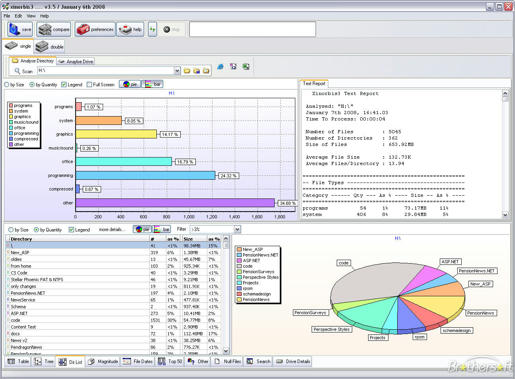
Xinorbis: hard disk analyser


Xinorbis is a simple but powerful hard disk analyser. Using a sophisticated mix of graphs, tables and tree displays, it gives the user a complete overview of the contents of a hard disk, folder, removable or network drive.

It makes it easy to see the contents, structure and file distribution and file composition of a whole hard disk, directory, or mapped network drive. Includes full report creation.

Xinorbis is available for download with an installer, the recommended option, or as a ZIP archive for expert users who want more control; installing Xinorbis on to a USB flash drive.

Several additions have been made to Xinorbis to make it operate more efficiently as a "portable application", for more information see the help pages.

Download:

http://www.mediafire.com/file/5zydmkikdz5/XinorbisInstall 4.2.6b.exe

Homepage:

http://www.freshney.org/index.htm


Features

analyse a single drive, folder or merge several together in one report

view the results by file type, attributes, size, user (owner) and date

the Folder History feature allows you to compare the contents of a folder or drive at times and dates

in-bullt powerful search engine (+ save results to a file or clipboard)

find duplicate files (by name and size)

complex report generation (with many user customisations) with export to HTML, ASCII, CSV or XML

save reports and tables for later comparison or for inclusion in other documents

shell support, scan a directory through Windows Explorer

updated regularly

What's new in 4.2.6

Added: Copy and paste to file extension category options

Added: 2GB+ magnitude category

Searches now work correctly when they contain multiple category or user parameters

Complete redesign of the Search Wizard

Improved "tree report" output options

Improved "more detail" display and added link to Detail Menu

Improved some icons for clarity

Improvements to memory usage


Sunday, February 14, 2010

Close All Windows

This tool helps you to close all running applications with one click. It does not use system resources because it only flashes a “close” signal to all open windows on the desktop and then ceases. Just place a shortcut to the tool in the Start Menu, Quick Launch or elsewhere.

Close All Windows

You can always add a hotkey to this shortcut. It is really very handy if you are running ~20 applications and want them all to quit instantly. It works just as if you were pressing the close button for each application.

Download - CloseAll.zip (18 KB)


Version History


Share This